
Convert HEIC photos to JPG without uploading them
 By Siavash Ghanbari · Published
Open Picstea's HEIC to JPG converter, drop your .heic photos on it, pick a quality and save. The conversion runs inside your browser, so the photos stay on your phone or computer the whole time. You can convert one photo or a whole batch, and nothing needs an account.
Why are my iPhone photos HEIC files?
iPhones and iPads save photos as HEIC (High Efficiency Image File) by default because the files are smaller than JPEGs of the same quality. Apple's own apps open them without a second thought. Many Windows PCs, Android phones, websites and upload forms still don't, which is usually when you find out your photos are in a format you never chose.
Why do most online converters upload your photos?
Decoding HEIC is real work, and the usual way to offer it on a website is to send your file to a server, convert it there and send a JPG back. That works, but your photos now sit on someone else's computer for a while. Holiday pictures, a scan of your passport or photos of your kids are exactly the files people convert, and exactly the ones you might not want to hand over.
How does Picstea convert HEIC on your device?
Picstea decodes HEIC with libheif, an open-source decoder, running in your browser. The first time you convert a HEIC file, Picstea loads the decoder (about 2 MB) from its own site. After that it is cached, and it keeps working offline once you install Picstea as an app. Your photo is read, turned the right way up and written out as a JPG without leaving the page.
Step by step
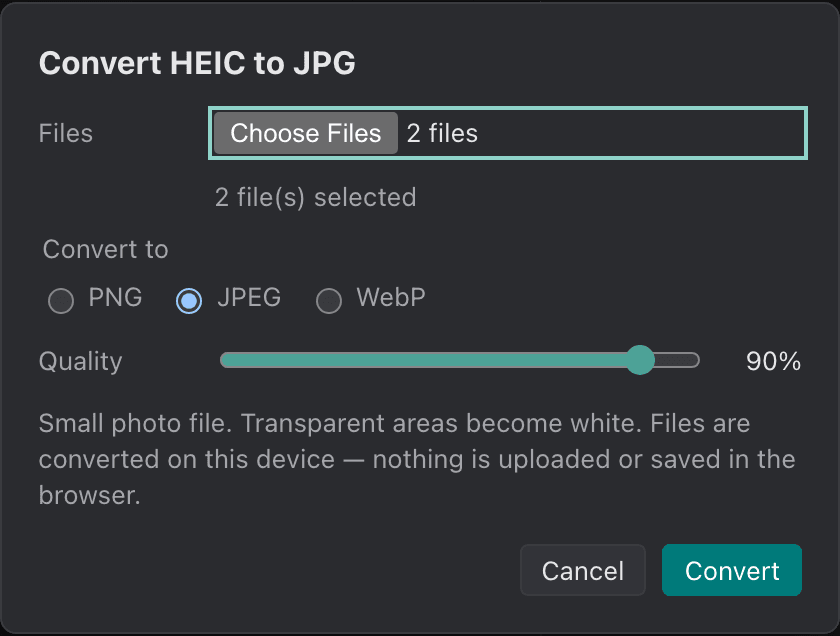
- Go to HEIC to JPG and click Convert now.
- Drop one or more .heic or .heif files, or choose them from your device.
- Choose a quality. 90 is the default, and 85 to 90 keeps photos looking the same as the original.
- Save the JPGs. Several photos can be saved together as a ZIP file.
Can I edit a HEIC photo before converting it?
Yes. Open the photo in the Picstea editor with File → Open, like any other image. It opens as a normal document, upright, and you can crop it, fix the colours, add text and export it as a JPG, PNG or WebP.
What is left out?
Picstea reads the main photo only. Live Photo videos, depth maps and burst frames are not converted, and camera details such as the location are not copied into the JPG. For most people that last part is a plus when they share a photo. The file formats guide lists everything Picstea opens and saves.
Questions people ask
Is it really not uploaded?
Really. The decoder comes from Picstea's own site and runs in your browser; your photo is never sent anywhere.
Will the JPG look worse?
At quality 85 to 90 you won't see a difference in normal viewing. The JPG will be bigger than the HEIC, because JPEG compresses less efficiently.
Can I convert HEIC to PNG instead?
Yes. Choose PNG instead of JPG in the converter; PNG files are larger but lossless.
Convert your HEIC photos, free and without uploading them.